Hello! This is dralnah, filling you all in on server updates for the end of the year, the whys, and how they’ll likely affect service. Firstly, Happy Thanksgiving to those of you in the US! I hope you had a great holiday. I’ve spent the holiday at home working on cleaning out the storage rooms and basement with my family. I sent out a brief notification a few days ago notifying people that all services provided under dralnah.com would be down for a few hours. This is because I was actually installing my server equipment in a proper server rack!
Server Rack
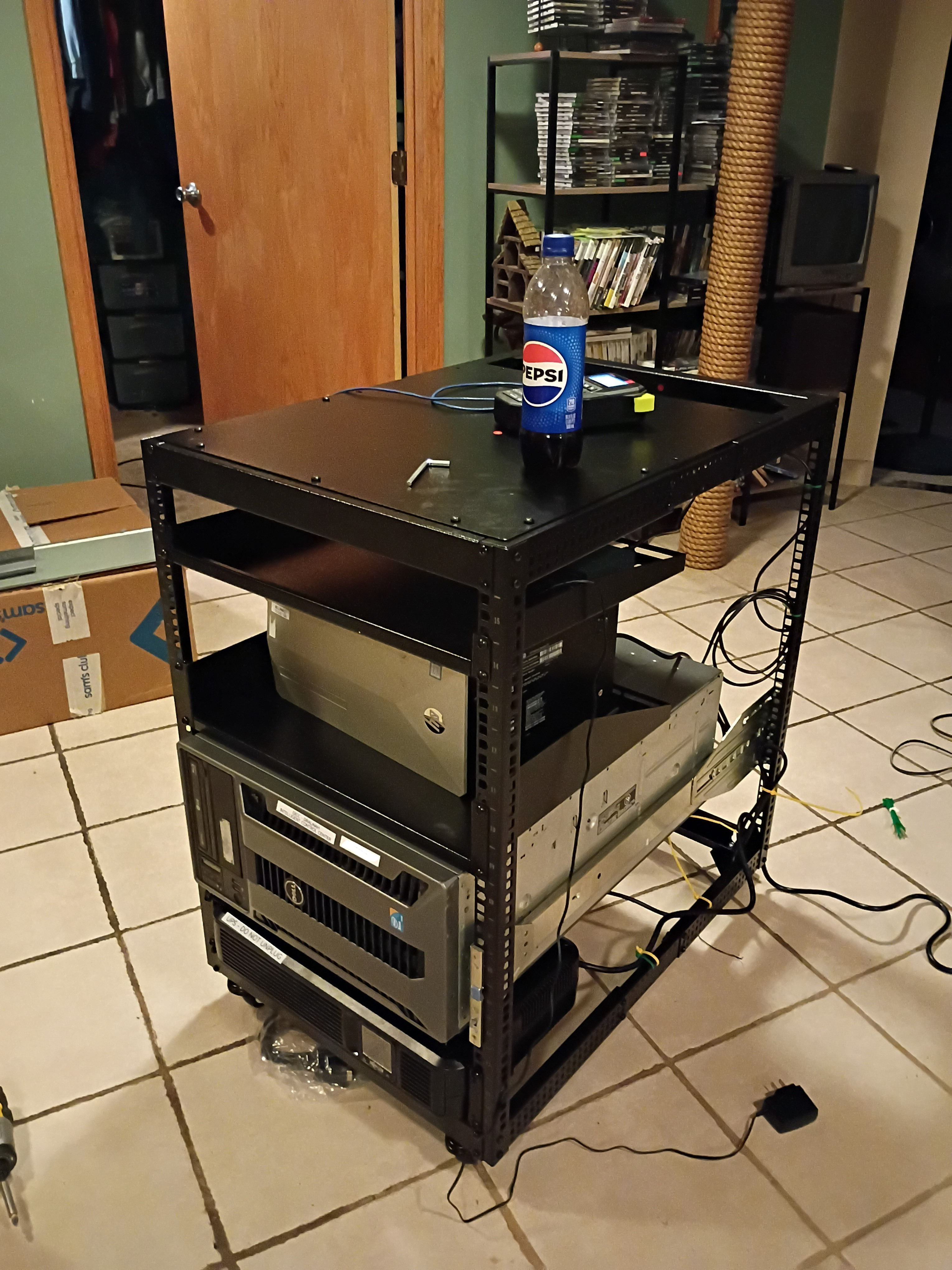
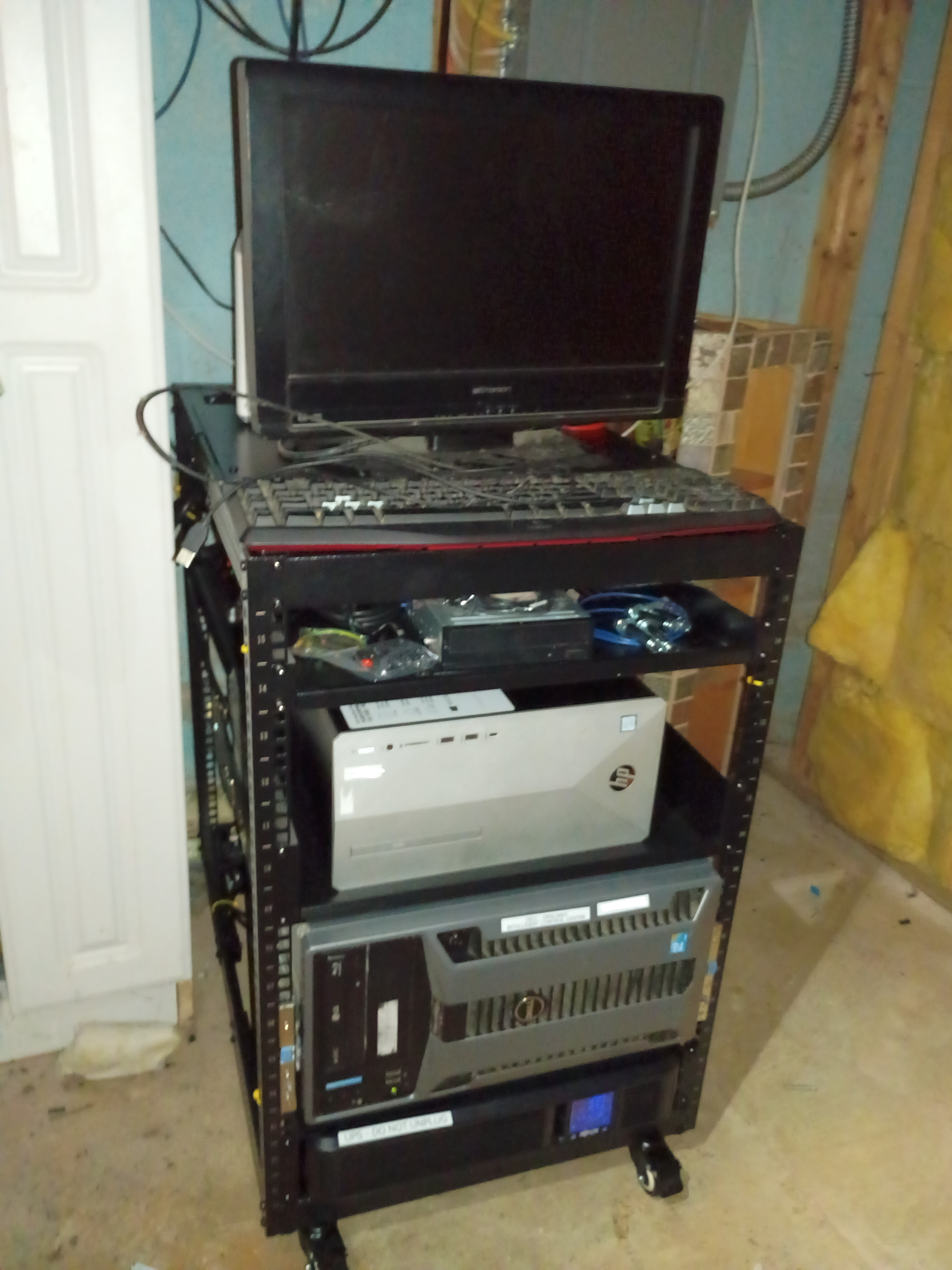
This was a sizable upgrade and not particularly cheap, not to mention the physical labor needed to put everything together. Due to the age of the main server, I had to find the rails for mounting it on a rack on ebay and get them shipped to my house from Australia. The server rack itself was a flat-pack, and I also ordered a very large UPS to keep power on everything.
The reasons for doing this were twofold: when there are brief power outages at my house (this happens quite frequently in the summer), I want to keep power on the server via the battery in the UPS in the case the power outage is brief enough to not cause issues with partial reboots on the server resulting in incorrectly done resarts or other issues I have to resolve manually. Secondly, the whole server setup currently resides in an unfinished, dusty storage room in my basement; this is also where the water tank for the house is kept. The server rack resolves the issue of having cluttered electronics scattered all over the floor, while also keeping everything out of the way of potentially harmful water should a leak spring in that room, and providing easy access for maintenance and upgrades.
Notably, I think I ordered a rack that was a little too small; I’d have liked a bit more room to put a big disk array I can hook up to the big server at some point, but that’s a resolvable issue later. For the moment, all the networking equipment in the house is present in the server rack, and a bit safer from environmental issues like dust and water.
Dralnah Chat Server
After much searching and a mostly failed attempt to use XMPP services earlier in the year, I think I’ve finally found the chat app I want to use on my server going forward. Fluxer is an open-source, self-hostable text chat and voice/video sharing application that I’ve been testing for a few weeks now. It has more or less full feature parity with Discord, and I can self-host it and give everybody access to features that would typically be locked behind some kind of paywall like Discord Nitro for free. It feels just like a diet Discord, but in a way I really like and appreciate, and there’s a lot of data safety and customization features on both the server and client ends. I’ve also seen some talk about potential open, public forum style chats that could be activated, but I haven’t tested those yet. The only thing it’s really lacking are discord-style bots that can be used on self-hosted servers, but I think those will happen down the line.
Point being, so far I really like using it, and if you want to try it, you can register here and I’ll approve you when I can. I’ll do a more full writeup on this later.
Blunko, The Little Server
My server setup up to this point has been very simple: there’s the small, 15-year-old Raspberry Pi 2B that has been used as a sort of “gateway;” its primary functions are to provide a reverse proxy service that redirects incoming internet traffic to the correct server, and it also acts as the primary point for Wireguard VPN services to connect to the internal network for the servers.
All the services I’ve been providing to people up to this point have been performed by the Dralnah Intelligent Command Center (DICC for short; I’m mature), the, large, old enterprise server I picked up a few years ago and shoved full of as many 8TB drives I can stuff on it. However, while the DICC has been phenomenal for its storage space and RAM, I do worry about putting all my eggs in one basket by having everything running off this server; when it goes down, the media server, file server, this blog, and the chat server along with several internal, private services I run for myself.
That is, until recently.
I’ve come into possession of a couple smaller computers as well; some new-ish HP Pavillions from the early 2020s. One of those is being donated to my friend so he can start his own home lab, but the other one is being introduced to my own home lab setup as Blunko. You can see it in the server rack pictures; the small silver PC sitting on the shelf sideways. Blunko’s job is going to be twofold, for the moment: it’s going to be the primary hardware running the chat server mentioned earlier, and it’s also possibly going to be taking over the services currently provided by the Raspberry Pi, acting as the gateway for the house and sole internet-facing device. This will hopefully speed up internal network speeds for faster transfers to and from the file server and faster streaming of video on the chat and media servers, with less latency. I’m also going to be backing up all the files from Blunko remotely to the DICC, and from there it’ll get backed up to a local backup system attached to my desktop, in case something goes down.
I may be adding some more services to Blunko in the future to help distribute the load, but for the moment the chat server and reverse proxy are Blunko’s primary functions, with the reverse proxy being something that’s in progress.
End of Year Maintenance
The end of the year is approaching fast, and that means server maintenance time. I’ve done a few things this year to make managing the server a little less stressful; for one, my desktop upstairs now contains a full backup of everything present on the server, and my server has backups for every other major networking component in the house. If anything goes down, I can rebuild it, with some time.
That fact is going to be relevant very soon, as I intend to do a complete re-configuration and install of the DICC.
For several months now, two of the drive bays on the DICC has been failing to load any drive, even when completely wiped and freshly formatted for use by the computer. One of these drive bays has been doing this since I received the machine, but the other one is new, and I’m unsure of the exact cause. That being said, my current drive system allows for up to 2 drives of the 6 available to it to fail completely before the system loses all its data, so I’m not particularly worried about losing all of that data soon. To be safe, I’ve taken a full system data backup, including all media content and server databases. I do have a suspect as to what might be causing those drive bays to fail, but without taking the server completely offline and testing things myself, it’ll be impossible to determine what exactly is wrong, as I also have to test whether or not all my old drives are still functional.
Over December, I’m going to be preparing to take the DICC offline by making sure I have data backups present. The primary server will be unavailable for what is likely several days around Christmas while I test discs, the drive bays, and perform some other maintenance tasks like re-flashing the hardware RAID controller with newer firmware. Part of this preparation has already been done by setting up Blunko; the chat and voice chat servers will remain online during the maintenance period, for communication purposes. I may temporarily move some other services over there, as well. However, Blunko doesn’t have nearly the 23TB of storage that DICC has, and I won’t be able to replicate all services effectively; primarily, the file server and media server will not be put back online until I can get the DICC back up and running, ideally with full drive bay use available.
Along with this preparation, I’m also preparing to “retire” the Raspberry Pi as the reverse proxy server, letting Blunko take over that position permanently. The Pi will still be used as a Wireguard proxy, at least for the foreseeable future, and until I’m able to sort some other solutions to problems out. As usual, changing network hierarchy can be a bit difficult and have some hiccups, so please bear with me and let me know if you spot an issue by emailing me at dralnah@dralnah.com or via Discord or my private chat server (username on both is @dralnah). If you don’t tell me something’s wrong, I may not notice for quite a while!
Looking Forward
These are a few things to expect going forward that may be interesting to those even outside the house, so I’m listing them here.
But first, I want to take a second to talk about how bad Xfinity modem/routers suck. While it’s fine if you just need a wifi point, any advanced configuration cannot be done directly through the router, and must be performed through the Xfinity app, which requires a sign-in to your account. This already sucks, but the app also puts arbitrary limits and obfuscations onto advanced settings. For example, you cannot change the DNS server of the router at all. It is permanently fixed to Xfinity’s choice of DNS server. This will be relevant later.
The app has actualy prevented me from doing proper network setup at several points. I had a major debaucle while setting up Blunko; the Xfinity app refused to recognize Blunko as connected to the network, even when it was hardwired in and I could ping and interact with the server just fine. I had to wait nearly 24 hours for Blunko to show up on my server list, which wouldn’t have been an issue, but you can’t port forward anything on the Xfinity app unless it sees that specific device connected to the network. So while I had the entire chat server set up, I couldn’t actually make it publicly available for 24 hours because the app said so! What I think happens behind the scenes is that there’s a central server that asks your Xfinity modem/router to scan your network for what’s available, and the app pulls from that central server’s database. Which is even more sketchy if that’s what’s happening!
To make a long story short, I hate the Xfinity modem/router because of its stupid, limiting app. I’ve got an old router I’d like to place between the modem and the rest of my network, and I’d like to place the Xfinity modem into bridge mode so it no longer functions as the router for the house, and I can control my own network entirely locally. The reason I haven’t done this yet is due to anticipating maintenance after I move out of this house, but with the server rack, I can simply move all of this equipment into a different house a little bit easier should it come to that.
As I mentioned previously, I’m going to be transitioning the Raspberry Pi off of its current primary roles of Wireguard tunnel provider and reverse proxy. However, I intend to keep the Pi on in an auxiliary role by putting PiHole on it; this is a DNS server that effectively removes ads from a vast majority of websites, including YouTube, for the whole household. I can only perform this change after the new router has been installed. An unintended side effect of the WireGuard services is that I could potentially offer ad-free browsing to anybody who has a WireGuard account and connects to my server. So… that’s neat.
I’m also looking into performing some updates on how I’m handling the media server and some other services; I want to make a page where people can see all available services at a given time, which could just as easily be a static webpage. I’ll just need to write one up. I want to make a recommendations queue for content desired on the media server, and I also want to open up a public-facing webpage for sign-in and use of the media server rather than going through the WireGuard interface as it’s currently set up. The page would still be password-locked, but I think it’d be better to simply have the server be available through a simple webpage and lookup. Some other updates to the media server would include looking into some kind of YouTube integration, adding some more music/concert related media, ripping my remaining record collection for the server, and potentially getting live TV services (and maybe recording?) hooked up through the server, mostly for my dad’s use.
Finally, I’m looking into expanding the homelab’s services to other things people may be interested in; I’ve got a white whale of an application I’d like to get set up, but aside from that, I’m mostly happy on my end. If anybody else has particular recommendations that they’d like to see for services available on the server, then please don’t hesitate to contact me.
Keeping Up To Date
I’ve been slowly shifting my presence off of Discord and more over to my chat server, as I’ve mentioned several times throughout this post. I’ll still certainly be around Discord, as I don’t expect nor want everybody to move over to my server, but it’s open to use by communities I’m in and my friends, and all data is kept internally by me; there’s no data storage on a cloud server somewhere.
I’ll likely keep using the blog-style format to keep people up to date, especially with longer posts like this, and just linking them on Discord/Fluxer. If people have an interest in seeing them elsewhere, just let me know!
My contact info at the top of the page (look for the little icons) should be accurate, but if it’s not:
Email: dralnah@dralnah.com Bluesky Discord: @dralnah
Happy Holidays, and Stay Safe! Dralnah